
AI Answering Service for Contractors — Never Miss a Lead Call Again
An AI answering service for contractors combines call routing, voicemail, and SMS into one flow so you stop losing jobs to missed calls. Instead of sending homeowners to dead-end voicemail, AI can text back, ask a few qualifying questions, and book the next step while you stay on the job.
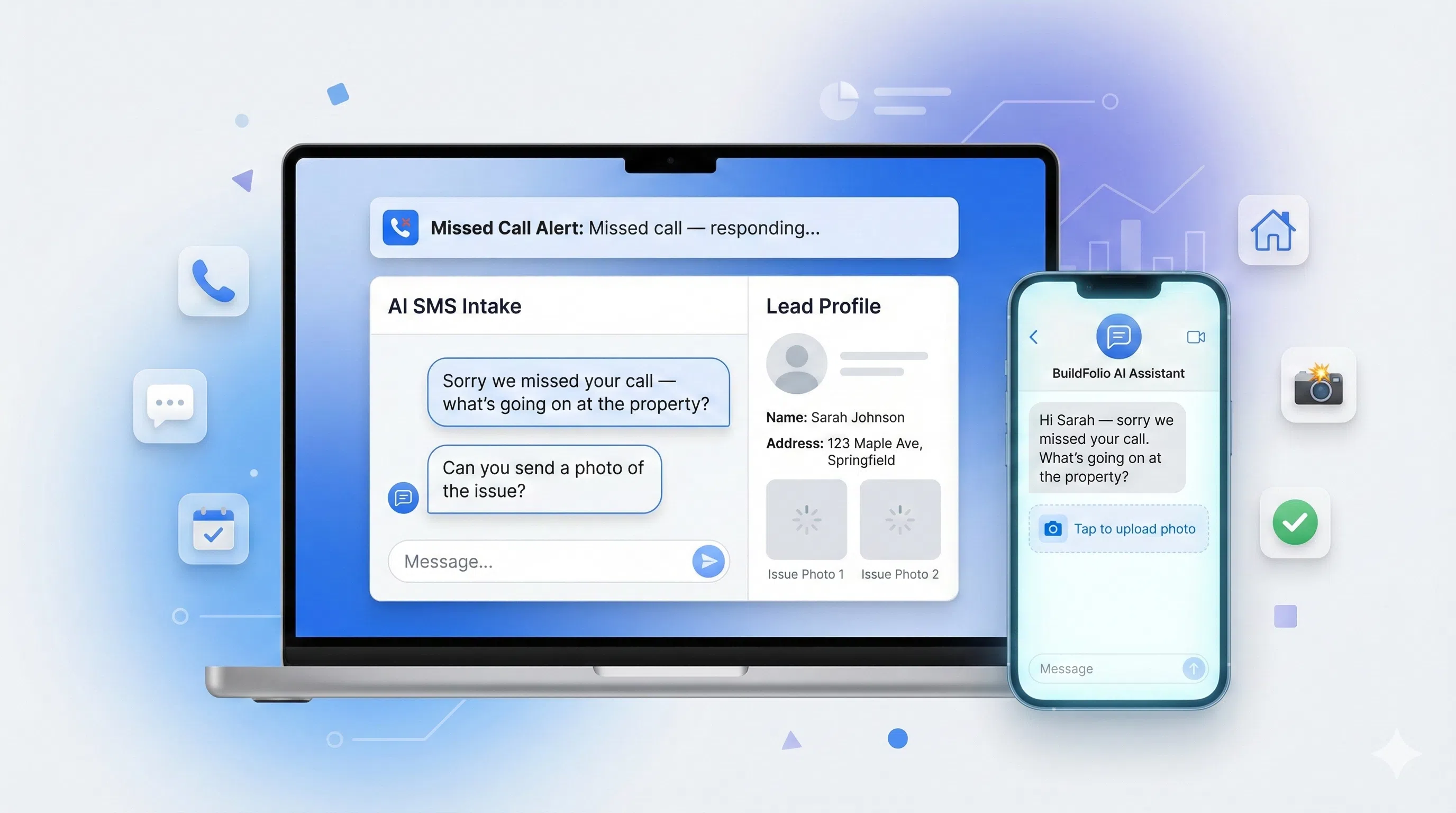
TL;DR — AI Answering Service
What it does: Automatically texts callers you miss, asks qualifying questions via AI, and creates a lead record in your job hub. Why it matters: 80% of callers won’t leave voicemail — this turns those missed opportunities into booked jobs. Cost: Included in BuildFolio Pro at $39/mo.
What is an AI answering service for contractors?
An AI answering service for contractors is a mix of call routing, voicemail, and SMS automation. When a homeowner calls and you can’t pick up, AI sends a text, asks a few smart questions, and creates a lead record—often before a traditional answering service could even pick up the phone.
What it does
- Detects a missed call from a new or existing customer
- Sends an instant SMS: “Sorry we missed you — what’s going on at the property?”
- Uses AI to ask intake questions (photos, address, urgency, budget)
- Pushes everything into your job hub or CRM as a qualified lead
Why contractors like it
- 24/7 coverage without hiring a live answering service
- Written record of every conversation for dispatch & sales
- Faster handoff into quoting and scheduling workflows
With BuildFolio, AI answering service is part of a full AI contractor automation stack (capture → quote → schedule → collect).
Why missed calls quietly kill contractor revenue
For most home-service teams, the phone is the pipeline. But on busy days you’re driving, on a roof, or under a house—so voicemails pile up and texts go unanswered. By the time you call back, they’ve already booked with someone else.
1) New leads hate voicemail
Homeowners with leaks, no-heat calls, or storm damage don’t want to “leave a message.” They want confirmation someone can help today.
2) Office staff is stretched thin
Even with a dispatcher, phones spike at the worst times. Calls overflow, and you end up with a patchwork of notes and sticky reminders.
3) No visibility on lost calls
Traditional phone systems don’t tell you which missed calls were actual opportunities. AI answering + text-back builds that data automatically.
How AI answering + missed-call text-back works
In BuildFolio, AI answering service starts with a simple rule: whenever you miss a call, start a smart SMS conversation that turns that call into a qualified lead.
Step-by-step flow
- Missed call detected from a unique number.
- BuildFolio triggers a missed-call text-back: “Sorry we missed you — what’s going on at the property?”
- AI asks a few follow-ups: address, photos, urgency, ideal timeframe.
- Conversation + media auto-save to your Job Hub.
- You or your team see a qualified record and can reply, call back, or run AI Photo-to-Quote from the photos.
Where AI actually helps (and where it doesn’t)
- Great at: capturing details, organizing info, scheduling follow-ups
- Great at: routing emergencies to the right on-call tech or dispatcher
- Use caution for: complex pricing, legal promises, or safety-critical advice — keep humans in the loop
AI answering service scripts you can copy
Use these scripts as your default flows. You can paste them into BuildFolio’s SMS automation to get started fast.
Missed-call text-back (emergency)
Hi {{first_name | "there"}} — {{company_name}} here.
Sorry we just missed your call.

Are you dealing with:
1) No heat / no cool
2) Active leak or backup
3) Power issue
4) Something else?

Reply with a number + a brief note and a photo if you can, and we'll jump on it.
Missed-call text-back (non-emergency)
Hi {{first_name | "there"}} — {{company_name}} here.
Sorry we missed your call!

Can you text a quick description + a couple photos of the project?
We'll review today and send options with rough pricing.
Follow-up after AI intake
Thanks for the info and photos, {{first_name}}
We've created a job record for you.

Next step:
- We'll review details
- Then send an estimate with options + monthly payment examples.

If this is urgent (today/tonight), reply URGENT so we can prioritize.
Hand-off to phone call
Got it — thanks for the details, {{first_name}}.

Best next step is a quick call to confirm options.
Can you talk in the next 15–30 minutes?

If yes, we'll call from this number so you can save it.
AI answering service vs voicemail vs live answering
You have options: hire a live answering service, keep doing voicemail, or layer in an AI answering service that’s tightly connected to your quoting tools.
| Option | What it looks like | Pros | Tradeoffs |
|---|---|---|---|
| Traditional voicemail | Caller hears a greeting and leaves a message (maybe). |
|
|
| Live answering service | Third-party reps answer with a script and take messages. |
|
|
| AI answering + text-back (BuildFolio) | Missed calls trigger smart SMS + intake tied to your jobs. |
|
|
Setup checklist: AI answering service with BuildFolio
You can roll out AI answering in phases. Here’s a simple checklist.
Forward your main line (or after-hours calls) to your BuildFolio number, or use a dedicated tracking number for web leads and campaigns.
Use our default missed-call SMS templates or paste the ones above. Set different flows for emergency vs non-emergency.
Pair AI answering with your lead capture form so calls and web leads share the same playbook: description, photos, budget, timeline.
Once leads are flowing, layer in AI Photo-to-Quote and invoice reminders so AI supports the full revenue workflow.
BuildFolio AI answering vs competitors
vs Jobber
Jobber tracks jobs but doesn’t have AI answering or missed-call text-back. BuildFolio captures leads 24/7 and routes them into AI quoting automatically.
vs ServiceTitan
ServiceTitan charges $300+/mo and requires long contracts. BuildFolio gives you AI answering, SMS automation, and lead capture for $39/mo with no lock-in.
vs Housecall Pro
Housecall Pro lacks true AI intake and photo-to-quote. BuildFolio turns missed calls into qualified leads with photos, details, and urgency — ready to quote.
Get your free Profit Score in 2 minutes — no signup required.
AI answering service for contractors: FAQ
Is an AI answering service the same as a chatbot?
Not exactly. A chatbot usually lives on your website only. An AI answering service for contractors is tied to your phone number, so missed calls automatically trigger texts, intake, and lead creation. You can still use a chatbot, but AI answering covers phone calls where the highest-intent leads come from.
Do homeowners get annoyed texting with AI instead of a person?
Most customers just want a fast response. When AI answering is done well, it feels like a friendly dispatcher collecting details so a tech or estimator can jump in. You can always have a human follow up with a phone call once the basics are captured.
Can I use BuildFolio’s AI answering if I already have Jobber / Housecall Pro / ServiceTitan?
Yes. Many teams run BuildFolio as a lead capture + AI layer in front of their existing dispatch or field-service software. You can keep your current tools for job management while BuildFolio focuses on intake, AI quoting, and follow-ups.
What does it cost to add AI answering service with BuildFolio?
Missed-call text-back and SMS workflows are included as part of BuildFolio’s tiers. You can start on the Free tier to test basic lead capture and upgrade to Pro ($39/mo) for full AI contractor automation. See the pricing page for details.
How do I know if AI answering is working?
Track recovered calls (conversations that started as missed calls), booked jobs from those leads, and the percentage of voicemails vs text-back conversations. Over a few weeks, you’ll see whether AI answering is turning “sorry we missed you” into real revenue.
Never let a good call die in voicemail.
Turn missed calls into qualified leads with AI answering service + SMS automations from BuildFolio.
Are you a homeowner? Try our free tools: