
Mobile Dashboard for Contractors
Everything you need on the truck: new leads, photos, calendar, quotes, and invoices. BuildFolio’s mobile dashboard is fast, thumb-friendly, and works great on iPhone/Android—so you can capture, quote, and collect on the go.
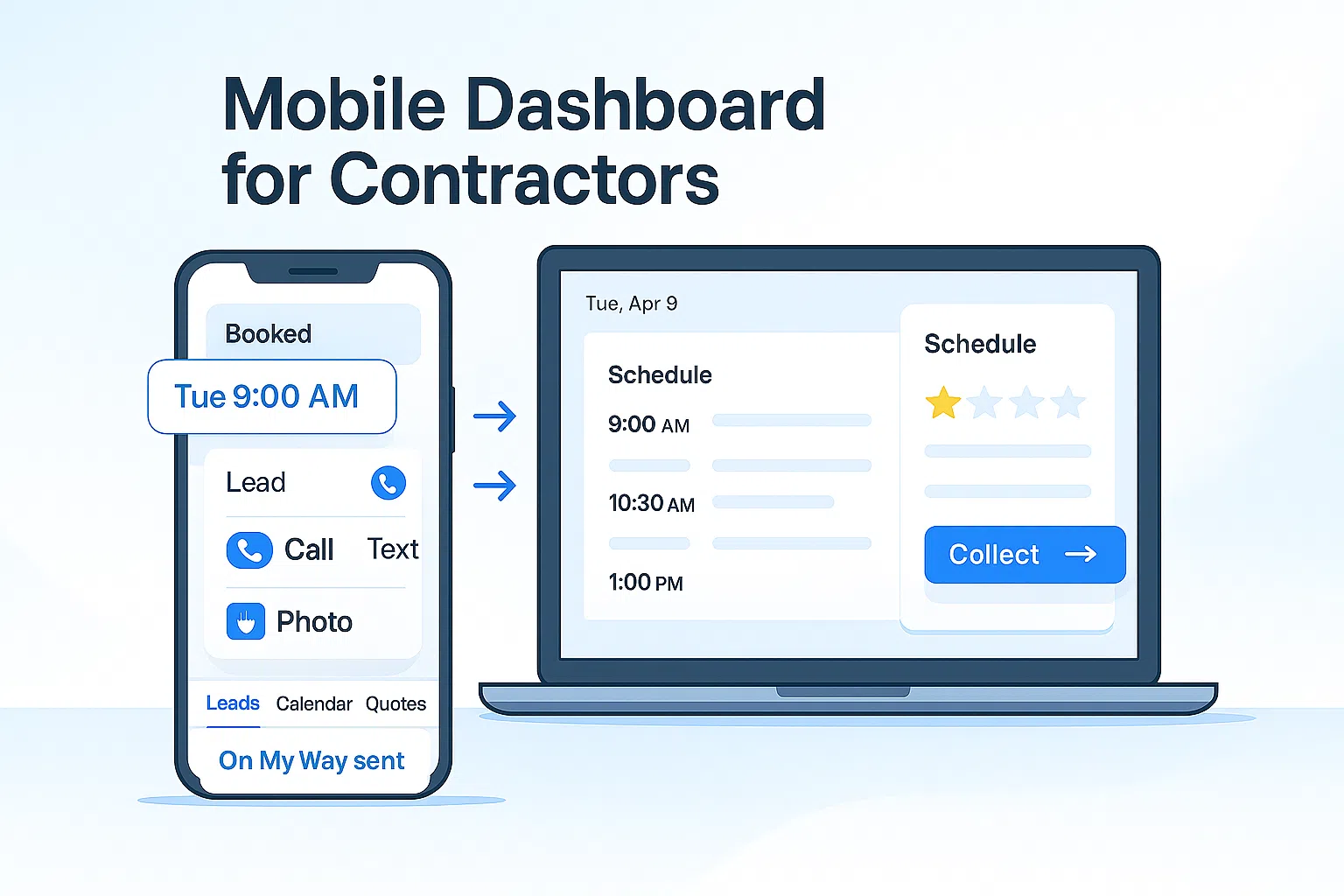
What is the mobile dashboard?
A streamlined BuildFolio interface that prioritizes speed and thumb reach. View today’s leads, open quotes, and upcoming jobs; send “On My Way” texts; capture photos; and nudge invoices—without opening a laptop.
- One tap to call, text, or open maps from any contact
- Fast photo intake → AI Photo-to-Quote
- Booking, reminders, and ETA with Calendar & On My Way
Use the manual missed-call follow-up guide alongside your mobile workflow. Automatic missed-call text-back is currently unavailable.
How it works in the field
Leads & photos
New website leads and photo uploads show up instantly. Tap to call, text, or request more pictures. See financing pre-qual prompts on the spot.
- Lead & financing widgets feed the list
- Attach site photos from camera roll
Draft & send
Convert photos into line items with AI Photo-to-Quote, tweak quantities and terms, and send the estimate while still in the driveway.
- Good/Better/Best bundles
- “As low as $/mo” with financing
Book & collect
Book time slots via the calendar widget, send “On My Way” texts, and chase balances with invoice reminders.
- Tap-to-navigate to job site
- Auto review requests after completion
Free vs Pro
Free — field basics
- Lead & photo intake list
- Today’s schedule view
- Send estimates & invoices
Perfect for solo operators and small crews.
Pro — automate the day
- AI Photo-to-Quote on mobile
- “On My Way” updates; missed-call replies handled manually
- AR aging alerts & mobile KPIs
Choose when to notify customers and when to alert your team.
Mobile-first features
Designed for one-hand use and quick actions between stops.
Thumb-reach actions
Primary buttons and tabs are placed low for fast access while holding the phone.
See “On My Way” →Smart attachments
Add photos, notes, and line items from the job site; convert to a quote in seconds.
AI Photo-to-Quote →Calendar & reminders
Book slots, send confirmations, and reduce no-shows with gentle reminders.
Calendar widget →Payments & AR
Send invoices and nudge unpaid balances; track AR aging from your phone.
Invoice reminders →Missed-call follow-up
Return missed calls personally when you can, using a clear callback or text.
Manual follow-up guide →Reputation
Wrap every job with a polite review request and track velocity over time.
Review automation →Set up in minutes
- Create your account. Start free and add your business info and services.
- Install widgets. Add the lead capture, calendar, and financing widgets to your site.
- Enable mobile actions. Turn on “On My Way”, review requests, and invoice reminders.
- Try AI quoting. Upload sample photos and let AI draft line items you can send quickly.
- Track KPIs. Watch speed-to-lead and quote conversion in Analytics.
Optional: connect QuickBooks Online to sync invoices and payments automatically.
FAQ: mobile & offline
Is there a native app?
The mobile dashboard runs great in your mobile browser and can be saved to your home screen. It’s built for speed and one-hand use.
Does it work with poor signal?
Most actions are lightweight. If the signal drops while uploading photos, they resume once you’re back online.
Can my techs access only their jobs?
Yes—use role-based access so field staff see only assigned schedules, messages, and documents.
Does it integrate with my calendar?
You can embed the BuildFolio calendar and send confirmations, reminders, and “On My Way” texts from mobile.
Your office, in your pocket.
Capture leads, quote from photos, book time, and collect payments—without leaving the driveway.
Are you a homeowner? Try our free tools: